About application delivery
Publish release artifacts
Publish releases in multiple formats to support different installation methods and customer environments. Some enterprise customers with Kubernetes expertise will install in their own cluster. Others will install on a VM or bare metal server. Enterprises with strict security requirements might deploy software in air gap environments with no outbound internet access.
A vendor might need to publish all of the following for a single release:
- Helm charts and container images
- Downloadable archives containing release images for air gap installations
- Installation scripts for Kubernetes clusters or VMs
Cryptographically sign all release artifacts so that enterprise customers can verify the authenticity and integrity of the software before installing.
Supply chain metadata
With the Enterprise Portal Security Center, you can include supply chain metadata for each release. This provides proof that your software supply chain is secure and traceable. For example:
- SBOMs (Software Bill of Materials) generated in SPDX JSON format
- Results of vulnerability scans, including CVE severity and affected images
For more information, see About the Security Center.
About the Enterprise Portal
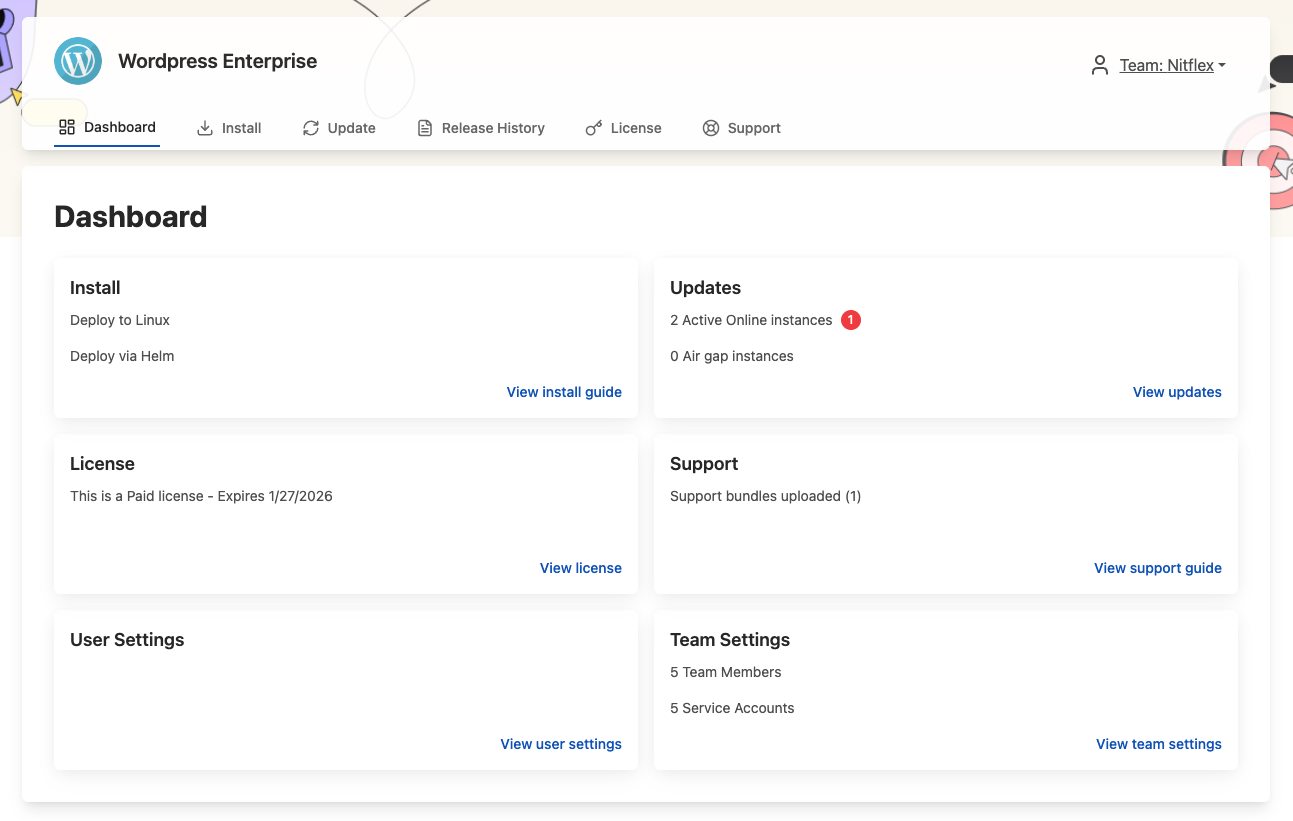
The Enterprise Portal is a customizable, web-based portal for your customers. From the Enterprise Portal, customers can:
- View install and update instructions for Embedded Cluster and Helm CLI installations
- Manage their team members and service accounts
- Upload support bundles
- View insights about their active and inactive instances
The following shows an example of the Enterprise Portal dashboard:
View a larger version of this image
Enterprise Portal access
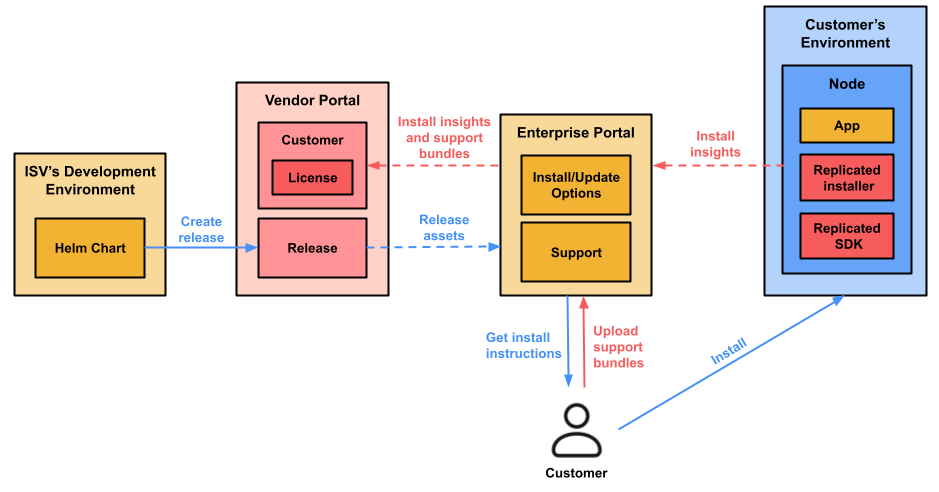
Customers access the Enterprise Portal outside their installation environment at a custom domain that you specify.
The following diagram shows how customers use the Enterprise Portal to access release assets and installation instructions, and upload support bundles:
View a larger version of this image
As shown in the diagram, licensed customers log in to the Enterprise Portal to access installation and update instructions. The Enterprise Portal tracks installation attempts and progress, then shares those insights to the Vendor Portal. Customers can also upload support bundles, which become available to you in the Vendor Portal.
For more information, see About the Enterprise Portal.
Preflight checks
Define preflight checks that customers run before installing to validate that their environment meets your application's requirements. Preflight checks increase the success rate of installations and upgrades by catching issues before they cause failures.
For more information, see About Preflight Checks and Support Bundles.
Guided installation experience
Embedded Cluster provides a guided installation experience through a web-based UI that walks end customers through configuration, preflight validation, and deployment. This makes it simpler for less technical customers to complete installation tasks, such as providing their license or configuring the deployment, without editing YAML files directly. This reduces installation errors and support issues related to installation. For Helm CLI installations, the Enterprise Portal provides install and update instructions with copy-paste commands tailored to the customer's environment and configuration.